


Description
Download Keyboard LaunchPad – Free Windows Keyboard Shortcut Tool for Productivity
Keyboard LaunchPad is a lightweight, trial version software utility designed exclusively for Windows users. Released in 2005, this compact tool enhances productivity by enabling users to launch applications, open files, and execute commands using customizable keyboard shortcuts. Despite its age, Keyboard LaunchPad remains a reliable option for those seeking a simple, fast, and secure way to navigate their system without relying on the mouse. With minimal system requirements and a small footprint, it's ideal for older Windows systems like Windows 98 and earlier versions. The program is available in English and has been downloaded over 23,000 times since its addition to our software library. Whether you're a power user, a student, or someone looking to streamline daily tasks, Keyboard LaunchPad offers a no-frills solution to boost efficiency. Its intuitive interface and straightforward setup make it easy to use, even for beginners. For those interested in a free, secure, and fast way to manage tasks via keyboard, this tool is worth exploring.
Enhanced Productivity with Custom Keyboard Shortcuts
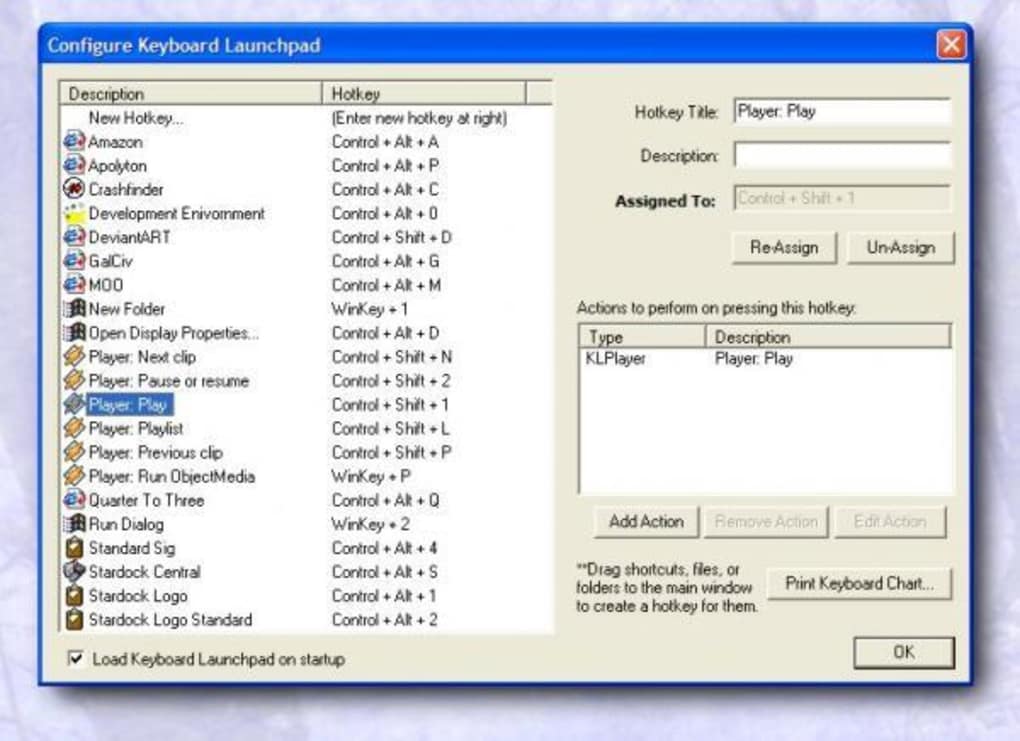
One of the standout features of Keyboard LaunchPad is its ability to transform your Windows experience through customizable keyboard shortcuts. Instead of navigating through multiple menus or searching for files manually, you can assign specific keys or key combinations to launch your most-used applications, open documents, or run scripts instantly. This functionality is especially beneficial for users who spend long hours at their computer, such as developers, writers, and designers. The program allows you to create shortcuts for anything from launching your favorite web browser to opening a specific project folder with a single keystroke.
Keyboard LaunchPad operates in the background, consuming minimal system resources, which makes it perfect for older machines running Windows 98 or earlier. Unlike many modern tools that demand high RAM and processing power, this software is optimized for efficiency. It doesn’t slow down your system or interfere with other applications. The interface is clean and unobtrusive, ensuring you stay focused on your work without distractions.
Another advantage is its simplicity. There’s no complex setup process—just install, configure your shortcuts, and start using it immediately. You can easily edit or delete shortcuts at any time, making it highly flexible. Whether you're automating repetitive tasks or just want to save time on daily workflows, Keyboard LaunchPad delivers real value. It’s a free tool that brings professional-grade efficiency to users of all skill levels, proving that powerful software doesn’t need to be complicated.
Easy Installation and Seamless Usage on Legacy Systems
Installing Keyboard LaunchPad is a breeze, especially for users working with older Windows systems. The software is designed to run on Windows 98 and earlier versions, which makes it a rare gem in today’s tech landscape. If you're still using a legacy machine or need a lightweight alternative to modern task managers, this tool fits perfectly. The download file is small, ensuring fast downloads even on slow internet connections. Once downloaded, simply run the installer and follow the on-screen instructions—no advanced technical knowledge required.
After installation, Keyboard LaunchPad runs silently in the system tray, ready to respond to your keyboard commands. You can access its settings by right-clicking the icon or using a predefined hotkey. The configuration panel is straightforward, allowing you to assign shortcuts, select target applications, and organize your commands into categories. You can also test your shortcuts in real time to ensure they work as expected.
For users who value privacy and security, Keyboard LaunchPad is a safe choice. It doesn’t collect personal data, doesn’t require internet access, and has no hidden ads or bundled software. Since it’s a trial version, full functionality is available during the evaluation period, giving you ample time to test its capabilities. This makes it ideal for both personal and professional use, especially in environments where software updates are limited or restricted.
Compatibility and System Requirements
Keyboard LaunchPad is specifically designed for older Windows operating systems, including Windows 98, Windows ME, and earlier versions. This targeted compatibility ensures that users with outdated hardware or software can still benefit from modern productivity tools. While it may not support Windows 10 or 11, it remains a viable solution for those maintaining legacy systems in educational institutions, small businesses, or personal setups.
Despite its age, the software is remarkably stable and efficient. It requires very little disk space and RAM, making it suitable for machines with limited resources. The program doesn’t rely on complex dependencies or external libraries, which reduces the risk of conflicts with other software. This simplicity is one of its greatest strengths—no need to worry about compatibility issues or system crashes.
For users looking to download and use Keyboard LaunchPad today, it’s important to note that the latest version (1.0) was released on September 26, 2005. While it hasn’t been updated since, its core functionality remains intact. The software is available for free, and there are no known security vulnerabilities reported to date. If you're seeking a secure, lightweight, and reliable keyboard shortcut manager for older Windows systems, Keyboard LaunchPad is a solid choice.
Key Features of Keyboard LaunchPad
- Launch applications with custom keyboard shortcuts
- Open files and folders instantly using key combinations
- Run scripts and batch commands via keyboard
- Minimal system resource usage
- Supports Windows 98 and earlier versions
- Simple, intuitive interface with real-time testing
- Free trial version with full functionality
- Runs silently in the system tray
- No ads, no data collection, no bloatware
Pros and Cons
Pros:
- Extremely lightweight and fast
- Perfect for older Windows systems
- Free to download and use
- Simple setup and intuitive controls
- Highly customizable shortcuts
- Secure and privacy-focused
Cons:
- No updates since 2005
- Not compatible with modern Windows versions
- Limited to English language only
- No built-in backup or export feature for shortcuts
- Minimal documentation available
Frequently Asked Questions (FAQ)
- Is Keyboard LaunchPad free to download?
Yes, Keyboard LaunchPad is available for free download. It’s a trial version with full functionality, allowing users to test all features without any cost.
- Can I use Keyboard LaunchPad on Windows 10 or 11?
No, the software is only compatible with Windows 98 and earlier versions. It does not support modern operating systems like Windows 10 or 11.
- Does Keyboard LaunchPad collect user data?
No, Keyboard LaunchPad is privacy-focused and does not collect, transmit, or store any personal data. It operates locally on your device.
- How do I install Keyboard LaunchPad?
Download the installer from the official source, run it, and follow the on-screen instructions. The process takes less than a minute.
- Can I customize the keyboard shortcuts?
Yes, you can assign any key or key combination to launch applications, open files, or run commands. The interface allows real-time testing of your shortcuts.
- Is there a way to export my shortcut settings?
Not currently, the software does not include an export or backup feature. You’ll need to manually recreate your shortcuts if reinstalling.
Conclusion: A Timeless Tool for Efficiency on Legacy Windows
While Keyboard LaunchPad may not be the newest software on the block, its simplicity, speed, and reliability make it a standout tool for users working with older Windows systems. In a world where modern apps demand high-end hardware, this lightweight utility proves that effective productivity tools don’t need to be complex. Whether you're managing a vintage PC in a classroom, running a small business with legacy software, or just want to boost your workflow without overhead, Keyboard LaunchPad delivers real value.
Its ability to launch apps, open files, and execute commands with a few keystrokes can save you valuable time every day. The free download, secure operation, and minimal system impact make it a smart choice for anyone seeking a no-nonsense productivity boost. While it lacks modern features and hasn’t been updated in nearly two decades, its core functionality remains intact and highly effective.
If you’re still using Windows 98 or an older version, or if you appreciate software that just works without fuss, download Keyboard LaunchPad today and experience a faster, more efficient way to interact with your computer.
Guides & Tutorials for Keyboard LaunchPad
How to install Keyboard LaunchPad
- Click the Preview / Download button above.
- Once redirected, accept the terms and click Install.
- Wait for the Keyboard LaunchPad download to finish on your device.
How to use Keyboard LaunchPad
This software is primarily used for its core features described above. Open the app after installation to explore its capabilities.
User Reviews for Keyboard LaunchPad 0
No reviews found





